

guiCreateScrollPane
Client-side
This creates a GUI scroll pane.
OOP Syntax Help! I don't understand this!
- Constructor: GuiScrollPane (...)
Syntax
gui-scrollpane|false guiCreateScrollPane ( float x, float y, float width, float height, [ bool relative = false, gui-element parent = nil ] )Required arguments
- x: The 2D x offset of the GUI scrollpane from its parent. This is affected by the relative argument.
- y: The 2D y offset of the GUI scrollpane from its parent. This is affected by the relative argument.
- width: The width of the GUI scrollpane. This is affected by the relative argument.
- height: The height of the GUI scrollpane. This is affected by the relative argument.
Optional arguments
Note: when using optional arguments , you might need to supply all arguments before the one you wish to use.
- relative (default: false): This is whether sizes and positioning are relative. If this is true, then all x, y, width and height floats must be between 0 and 1, representing sizes relative to the parent.
- parent (default: nil): This is the parent that the gui scrollpane is attached to. If the
relativeargument is true, sizes and positioning will be made relative to this parent. If therelativeargument is false, positioning will be the number of offset pixels from the parent's origin. If no parent is passed, the parent will become the screen - causing positioning and sizing according to screen positioning.
Returns
The gui-scrollpane if created, otherwise false.
- gui-scrollpane|false: result
Code Examples
client
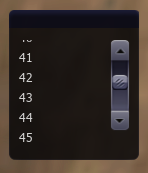
This example creates a small window with a scrollpane on. Using the /fill command you can populate the scrollpane with the names of every player in the server.
local scrollpane
addEventHandler("onClientResourceStart", resourceRoot, function()    -- create a window and create a scrollpane on it    local window = guiCreateWindow(5, 5, 130, 150, "", false)    -- the width and height values here are largely irrelevant as the scrollpane will automatically resize when needed    scrollpane = guiCreateScrollPane(0, 0, 130, 150, false, window)end)
addCommandHandler("fill", function()    -- if the scrollpane exists    if scrollpane then        -- delete all the existing labels        for i, v in ipairs(getElementChildren(scrollpane)) do            destroyElement(v)        end
-- for every player in the server for i, v in ipairs(getElementsByType("player")) do -- create a label with their name on the scrollpane guiCreateLabel(5, i * 20, 90, 20, tostring(getPlayerName(v)), false, scrollpane) end endend)Gallery
Click on the image to view the full preview along with the description.
See Also
GUI Functions
- getChatboxCharacterLimit
- getChatboxLayout
- guiBlur
- guiBringToFront
- guiCheckBoxGetSelected
- guiCheckBoxSetSelected
- guiComboBoxAddItem
- guiComboBoxClear
- guiComboBoxGetItemCount
- guiComboBoxGetItemText
- guiComboBoxGetSelected
- guiComboBoxIsOpen
- guiComboBoxRemoveItem
- guiComboBoxSetItemText
- guiComboBoxSetOpen
- guiComboBoxSetSelected
- guiCreateBrowser
- guiCreateButton
- guiCreateCheckBox
- guiCreateComboBox
- guiCreateEdit
- guiCreateFont
- guiCreateGridList
- guiCreateLabel
- guiCreateMemo
- guiCreateProgressBar
- guiCreateRadioButton
- guiCreateScrollBar
- guiCreateScrollPane
- guiCreateStaticImage
- guiCreateTab
- guiCreateTabPanel
- guiCreateWindow
- guiDeleteTab
- guiEditGetCaretIndex
- guiEditGetMaxLength
- guiEditIsMasked
- guiEditIsReadOnly
- guiEditSetCaretIndex
- guiEditSetMasked
- guiEditSetMaxLength
- guiEditSetReadOnly
- guiFocus
- guiGetAlpha
- guiGetBrowser
- guiGetCursorType
- guiGetEnabled
- guiGetFont
- guiGetInputEnabled
- guiGetInputMode
- guiGetPosition
- guiGetProperties
- guiGetProperty
- guiGetScreenSize
- guiGetSelectedTab
- guiGetSize
- guiGetText
- guiGetVisible
- guiGridListAddColumn
- guiGridListAddRow
- guiGridListAutoSizeColumn
- guiGridListClear
- guiGridListGetColumnCount
- guiGridListGetColumnTitle
- guiGridListGetColumnWidth
- guiGridListGetHorizontalScrollPosition
- guiGridListGetItemColor
- guiGridListGetItemData
- guiGridListGetItemText
- guiGridListGetRowCount
- guiGridListGetSelectedCount
- guiGridListGetSelectedItem
- guiGridListGetSelectedItems
- guiGridListGetSelectionMode
- guiGridListGetVerticalScrollPosition
- guiGridListInsertRowAfter
- guiGridListIsSortingEnabled
- guiGridListRemoveColumn
- guiGridListRemoveRow
- guiGridListSetColumnTitle
- guiGridListSetColumnWidth
- guiGridListSetHorizontalScrollPosition
- guiGridListSetItemColor
- guiGridListSetItemData
- guiGridListSetItemText
- guiGridListSetScrollBars
- guiGridListSetSelectedItem
- guiGridListSetSelectionMode
- guiGridListSetSortingEnabled
- guiGridListSetVerticalScrollPosition
- guiLabelGetColor
- guiLabelGetFontHeight
- guiLabelGetTextExtent
- guiLabelSetColor
- guiLabelSetHorizontalAlign
- guiLabelSetVerticalAlign
- guiMemoGetCaretIndex
- guiMemoGetVerticalScrollPosition
- guiMemoIsReadOnly
- guiMemoSetCaretIndex
- guiMemoSetReadOnly
- guiMemoSetVerticalScrollPosition
- guiMoveToBack
- guiProgressBarGetProgress
- guiProgressBarSetProgress
- guiRadioButtonGetSelected
- guiRadioButtonSetSelected
- guiScrollBarGetScrollPosition
- guiScrollBarSetScrollPosition
- guiScrollPaneGetHorizontalScrollPosition
- guiScrollPaneGetVerticalScrollPosition
- guiScrollPaneSetHorizontalScrollPosition
- guiScrollPaneSetScrollBars
- guiScrollPaneSetVerticalScrollPosition
- guiSetAlpha
- guiSetEnabled
- guiSetFont
- guiSetInputEnabled
- guiSetInputMode
- guiSetPosition
- guiSetProperty
- guiSetSelectedTab
- guiSetSize
- guiSetText
- guiSetVisible
- guiStaticImageGetNativeSize
- guiStaticImageLoadImage
- guiWindowIsMovable
- guiWindowIsSizable
- guiWindowSetMovable
- guiWindowSetSizable
- isChatBoxInputActive
- isConsoleActive
- isDebugViewActive
- isMainMenuActive
- isMTAWindowActive
- isTransferBoxActive
- setChatboxCharacterLimit
- setDebugViewActive