

dxCreateTexture
Updated in 1.6.0-9.22188
This function creates a texture element that can be used in the dxDraw functions.
- It is recommended to pre-convert textures to whatever format you want to load them as. ARGB should be PNG, all other formats are self explanatory. By doing this you can load textures on the fly without any hickups (Note: There might still be some if the user has a slow HHD). See DirectXTex texconv tool.
- For vector textures (.svg) use svgCreate.
- It is highly recommended that dxSetTestMode is used when writing and testing scripts using dxCreateTexture.
- You should always check to see if this function has returned false.
This function uses significant process RAM, make sure you don't load a lot of textures, because you'll run out of memory and crash MTA on your gaming PC beyond the technical limit of 3.5-4 GB (weak PC users much earlier). Besides that, don't make the common mistake of causing a memory leak by not destroying textures (causing dxTextures to pile up) when they should no longer display per your script, which causes FPS lag and crashes all over MTA due to so many scripters missing it.
OOP Syntax Help! I don't understand this!
- Constructor: DxTexture (...)
Syntax
texture|false dxCreateTexture ( string pixels/filepath, [ string textureFormat = "argb", bool mipmaps = true, string textureEdge = "wrap" ] )Required arguments
- pixels/filepath: Pixels containing image data. (
plain,jpegorpngpixels can be used here). Or The filepath of the image. (.bmp, .dds, .jpg, .png, and .tga images are supported) - for .svg use svgCreate. Image files should ideally have dimensions that are a power of two, to prevent possible blurring.
Optional arguments
Note: when using optional arguments , you might need to supply all arguments before the one you wish to use.
- textureFormat (default: "argb"): A string representing the desired texture format.
- argb: RGB uncompressed 32 bit color (default).
- rgb: RGB uncompressed 16-bit RGB color format. Uses 5 bits for red, 6 bits for green, and 5 bits for blue.
- xrgb: RGB Uncompressed 32-bit RGB color format without alpha. Each pixel uses 8 bits for red, green, and blue. The highest 8 bits are unused (padding) and should be ignored.
- dxt1: DXT1 compressed - Can take a fraction of a second longer to load (unless the file is already a DXT1 .dds). Uses 8 times less video memory than ARGB and can speed up drawing. Quality not as good as ARGB. It supports alpha blending, but it can only be on or off, that is: either 0 or 255.
- dxt3: DXT3 compressed - Can take a fraction of a second longer to load (unless the file is already a DXT3 .dds). Uses 4 times less video memory than ARGB and can speed up drawing. Quality slightly better than DXT1 and supports crisp alpha blending.
- dxt5: DXT5 compressed - Can take a fraction of a second longer to load (unless the file is already a DXT5 .dds). Uses 4 times less video memory than ARGB and can speed up drawing. Quality slightly better than DXT1 and supports smooth alpha blending.
- intz: Depth-stencil texture format used for sampling depth buffers in shaders.
- df24: 24-bit depth buffer format with optional stencil support, exposed as a texture.
- df16: 16-bit depth buffer format exposed as a texture.
- rawz: Raw depth texture format providing direct access to depth buffer values.
- mipmaps (default: true): true to create a mip-map chain so the texture looks good when drawn at various sizes.
- textureEdge (default: "wrap"): A string representing the desired texture edge handling.
- wrap: Wrap the texture at the edges (default).
- clamp: Clamp the texture at the edges. This may help avoid edge artifacts.
- mirror: Mirror the texture at the edges.
- border
- mirror-once
Returns
Returns a texture if successful, false if invalid arguments were passed to the function or there is insufficient resources available.
- texture|false: texture element
Second Client Syntax
texture|false dxCreateTexture ( int width, int height, [ string textureFormat = "argb", string textureEdge = "wrap", string textureType = "2d", int depth = 1 ] )Required arguments
- width: Desired width, preferably power of two (16, 32, 64 etc.), maximum is 16384.
- height: Desired height, preferably power of two (16, 32, 64 etc.), maximum is 16384.
Optional arguments
Note: when using optional arguments , you might need to supply all arguments before the one you wish to use.
- textureFormat (default: "argb"): A string representing the desired texture format.
- argb: RGB uncompressed 32 bit color (default).
- rgb: RGB uncompressed 16-bit RGB color format. Uses 5 bits for red, 6 bits for green, and 5 bits for blue.
- xrgb: RGB Uncompressed 32-bit RGB color format without alpha. Each pixel uses 8 bits for red, green, and blue. The highest 8 bits are unused (padding) and should be ignored.
- dxt1: DXT1 compressed - Can take a fraction of a second longer to load (unless the file is already a DXT1 .dds). Uses 8 times less video memory than ARGB and can speed up drawing. Quality not as good as ARGB. It supports alpha blending, but it can only be on or off, that is: either 0 or 255.
- dxt3: DXT3 compressed - Can take a fraction of a second longer to load (unless the file is already a DXT3 .dds). Uses 4 times less video memory than ARGB and can speed up drawing. Quality slightly better than DXT1 and supports crisp alpha blending.
- dxt5: DXT5 compressed - Can take a fraction of a second longer to load (unless the file is already a DXT5 .dds). Uses 4 times less video memory than ARGB and can speed up drawing. Quality slightly better than DXT1 and supports smooth alpha blending.
- intz: Depth-stencil texture format used for sampling depth buffers in shaders.
- df24: 24-bit depth buffer format with optional stencil support, exposed as a texture.
- df16: 16-bit depth buffer format exposed as a texture.
- rawz: Raw depth texture format providing direct access to depth buffer values.
- textureEdge (default: "wrap"): A string representing the desired texture edge handling.
- wrap: Wrap the texture at the edges (default).
- clamp: Clamp the texture at the edges. This may help avoid edge artifacts.
- mirror: Mirror the texture at the edges.
- border
- mirror-once
- textureType (default: "2d"): A string representing the desired texture type.
- 2d: Standard texture (default).
- 3d: Volume texture.
- cube: Cube map.
- depth (default: 1): Desired number of slices when creating a volume texture.
Returns
Returns a texture if successful, false if invalid arguments were passed to the function or there is insufficient resources available.
- texture|false: texture element
Code Examples
local myImage
addEventHandler("onClientRender", root, function()    if myImage then        dxDrawImage(100, 350, 300, 350, myImage)    endend)
-- Use 'toggle' command to switch image on and offaddCommandHandler("toggle", function() if not myImage then myImage = dxCreateTexture("moonpig.png") -- Create texture else destroyElement(myImage) -- Destroy texture myImage = nil endend)Gallery
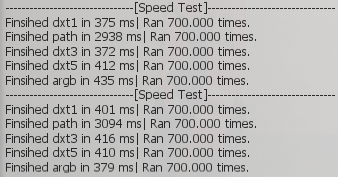
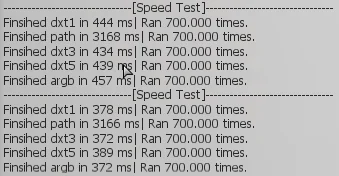
Click on the image to view the full preview along with the description.
Changelog
See Also
Drawing Functions
- dxConvertPixels
- dxCreateFont
- dxCreateRenderTargetUpdated
- dxCreateScreenSource
- dxCreateShader
- dxCreateTextureUpdated
- dxDrawCircle
- dxDrawImage
- dxDrawImageSection
- dxDrawLine
- dxDrawLine3D
- dxDrawMaterialLine3D
- dxDrawMaterialPrimitive
- dxDrawMaterialPrimitive3D
- dxDrawMaterialSectionLine3D
- dxDrawModel3DNew
- dxDrawPrimitive
- dxDrawPrimitive3D
- dxDrawRectangle
- dxDrawText
- dxDrawWiredSphere
- dxGetBlendMode
- dxGetFontHeight
- dxGetMaterialSize
- dxGetPixelColor
- dxGetPixelsFormat
- dxGetPixelsSize
- dxGetStatusUpdated
- dxGetTextSize
- dxGetTexturePixelsUpdated
- dxGetTextWidth
- dxIsAspectRatioAdjustmentEnabled
- dxSetAspectRatioAdjustmentEnabled
- dxSetBlendMode
- dxSetPixelColor
- dxSetRenderTarget
- dxSetShaderTessellation
- dxSetShaderTransform
- dxSetShaderValue
- dxSetTestMode
- dxSetTextureEdge
- dxSetTexturePixels
- dxUpdateScreenSource