

dxDrawImageSection
Client-side
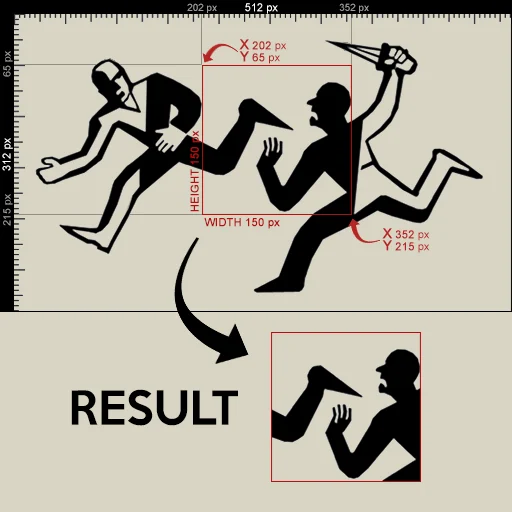
Differing from dxDrawImage, this function only draws a part of an image on the screen for a single frame. In order for the image to stay visible continuously, you need to call this function with the same parameters on each frame update (see onClientRender).
Image files should ideally have dimensions that are a power of two, to prevent possible blurring. Power of two: 2px, 4px, 8px, 16px, 32px, 64px, 128px, 256px, 512px, 1024px...
Tip
- Do not draw image from path. Use a texture created with dxCreateTexture instead to efficiently draw image.
- To help prevent edge artifacts when drawing textures, set textureEdge to
clampwhen calling dxCreateTexture.
Syntax
bool dxDrawImageSection ( float posX, float posY, float width, float height, float u, float v, float usize, float vsize, string/texture image, [ float rotation = 0, float rotationCenterOffsetX = 0, float rotationCenterOffsetY = 0, int color = tocolor(255,255,255,255), bool postGUI = false ] )Required arguments
- posX: The absolute X coordinate of the top left corner of the image.
- posY: The absolute Y coordinate of the top left corner of the image.
- width: The absolute width of the image.
- height: The absolute height of the image.
- u: The absolute X coordinate of the top left corner of the section which should be drawn from image.
- v: The absolute Y coordinate of the top left corner of the section which should be drawn from image.
- usize: The absolute width of the image section.
- vsize: The absolute height of the image section.
- image: Either a texture element or a filepath of the image which is going to be drawn. Image files should ideally have dimensions that are a power of two, to prevent possible blurring. Use a texture created with dxCreateTexture to speed up drawing.
Optional arguments
Note: when using optional arguments, you might need to supply all arguments before the one you wish to use.
- rotation (default: 0): The rotation, in degrees for the image.
- rotationCenterOffsetX (default: 0): the absolute X offset from the image center for which to rotate the image from.
- rotationCenterOffsetY (default: 0): the absolute Y offset from the image center for which to rotate the image from.
- color (default: tocolor(255,255,255,255)): the color of the image, a value produced by tocolor or hexadecimal number in format: 0xAARRGGBB (AA = alpha, RR = red, GG = green, BB = blue).
- postGUI (default: false): A bool representing whether the image should be drawn on top of or behind any ingame GUI (rendered by CEGUI).
Returns
Returns true if successful, false otherwise.
- bool: result
Code Examples
client
The example draws a section of an image.
local myimg = dxCreateTexture("myimage.png") -- Make This Image as texture
addEventHandler('onClientRender', root, function()    if (myimg) then        dxDrawImageSection(400, 200, 100, 100, 0, 0, 100, 100, myimg) -- draw image section that clip part of image from start of image to 100 as width and height    endend)
Gallery
Click on the image to view the full preview along with the description.
See Also
Drawing Functions
- dxConvertPixels
- dxCreateFont
- dxCreateRenderTargetUpdated
- dxCreateScreenSource
- dxCreateShader
- dxCreateTextureUpdated
- dxDrawCircle
- dxDrawImage
- dxDrawImageSection
- dxDrawLine
- dxDrawLine3D
- dxDrawMaterialLine3D
- dxDrawMaterialPrimitive
- dxDrawMaterialPrimitive3D
- dxDrawMaterialSectionLine3D
- dxDrawModel3DNew
- dxDrawPrimitive
- dxDrawPrimitive3D
- dxDrawRectangle
- dxDrawText
- dxDrawWiredSphere
- dxGetBlendMode
- dxGetFontHeight
- dxGetMaterialSize
- dxGetPixelColor
- dxGetPixelsFormat
- dxGetPixelsSize
- dxGetStatusUpdated
- dxGetTextSize
- dxGetTexturePixelsUpdated
- dxGetTextWidth
- dxIsAspectRatioAdjustmentEnabled
- dxSetAspectRatioAdjustmentEnabled
- dxSetBlendMode
- dxSetPixelColor
- dxSetRenderTarget
- dxSetShaderTessellation
- dxSetShaderTransform
- dxSetShaderValue
- dxSetTestMode
- dxSetTextureEdge
- dxSetTexturePixels
- dxUpdateScreenSource