

dxDrawPrimitive
Client-side
This function draws a 2D primitive shape across the screen - rendered for one frame. This should be used in conjunction with onClientRender in order to display continuously.
Syntax
bool dxDrawPrimitive ( string pType, bool postGUI, table vertex1, [ table vertex2... = nil ] )Required arguments
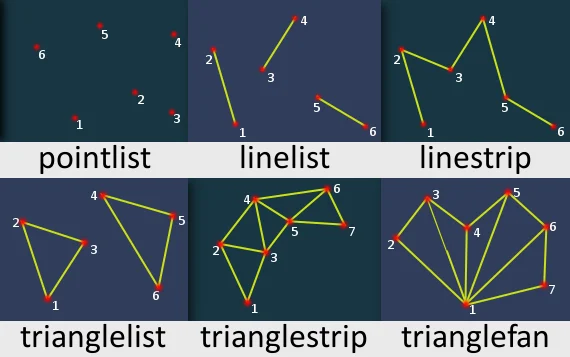
- pType: Type of primitive to be drawn.
- pointlist: Renders the vertices as a collection of isolated points.
- linelist: Renders the vertices as a list of isolated straight line segments.
- linestrip: Renders the vertices as a single polyline.
- trianglelist: Renders the specified vertices as a sequence of isolated triangles. Each group of three vertices defines a separate triangle.
- trianglestrip: Renders the vertices as a triangle strip.
- trianglefan: Renders the vertices as a triangle fan.
- postGUI: A bool representing whether the line should be drawn on top of or behind any ingame GUI (rendered by CEGUI).
- vertex1: Tables representing each primitive vertex, required amount of them is determined by primitive type. See vertices format below:
- posX - An float representing the absolute X position of the vertex, represented by pixels on the screen.
- posY - An float representing the absolute Y position of the vertex, represented by pixels on the screen.
- color (optional) - An integer of the hex color, produced using tocolor or 0xAARRGGBB (AA = alpha, RR = red, GG = green, BB = blue). If it's not specified, white color is used.
Optional arguments
Note: when using optional arguments , you might need to supply all arguments before the one you wish to use.
- vertex2... (default: nil): Tables representing each primitive vertex, required amount of them is determined by primitive type. Check table format above.
Returns
Returns a true if the operation was successful, false otherwise.
- bool: result
Code Examples
client
This is a small example that creates trianglefan primitive with vertices in places that user clicks. It assigns every vertex random color.
local vertices = {}function onClick(btn, state, x, y)  if btn ~= "left" then return end  if state ~= "up" then return end  local vertex = {x, y, tocolor(math.random(255), math.random(255), math.random(255))}  table.insert(vertices, vertex)endaddEventHandler("onClientClick", root, onClick)
function draw() dxDrawPrimitive("trianglefan", true, unpack(vertices))endaddEventHandler("onClientPreRender", root, draw)Gallery
Click on the image to view the full preview along with the description.
See Also
Drawing Functions
- dxConvertPixels
- dxCreateFont
- dxCreateRenderTargetUpdated
- dxCreateScreenSource
- dxCreateShader
- dxCreateTextureUpdated
- dxDrawCircle
- dxDrawImage
- dxDrawImageSection
- dxDrawLine
- dxDrawLine3D
- dxDrawMaterialLine3D
- dxDrawMaterialPrimitive
- dxDrawMaterialPrimitive3D
- dxDrawMaterialSectionLine3D
- dxDrawModel3DNew
- dxDrawPrimitive
- dxDrawPrimitive3D
- dxDrawRectangle
- dxDrawText
- dxDrawWiredSphere
- dxGetBlendMode
- dxGetFontHeight
- dxGetMaterialSize
- dxGetPixelColor
- dxGetPixelsFormat
- dxGetPixelsSize
- dxGetStatusUpdated
- dxGetTextSize
- dxGetTexturePixelsUpdated
- dxGetTextWidth
- dxIsAspectRatioAdjustmentEnabled
- dxSetAspectRatioAdjustmentEnabled
- dxSetBlendMode
- dxSetPixelColor
- dxSetRenderTarget
- dxSetShaderTessellation
- dxSetShaderTransform
- dxSetShaderValue
- dxSetTestMode
- dxSetTextureEdge
- dxSetTexturePixels
- dxUpdateScreenSource