

dxDrawMaterialPrimitive3D
This function draws a 3D primitive shape with material applied to it in the 3D world - rendered for one frame. This should be used in conjunction with onClientRender/onClientPreRender in order to display continuously.
If image file is used, it should ideally have dimensions that are a power of two, to prevent possible blurring. Power of two: 2px, 4px, 8px, 16px, 32px, 64px, 128px, 256px, 512px, 1024px...
- This function can be used to draw billboards in the game world. You have to understand the mathematical models about the human vision to calculate the proper vertices.
- When a 3D draw call is issued by any such material MTA function then the principle to push it directly to the 3D adapter does apply. To achieve this there is no software-side 3D clipping mathematics being performed. This way the vertex data is always being pushed to the vertex shader, leaving the entire freedom to the developer on how to interpret this vertex data in the shader. For example, even though this function does imply an use in 3D world space, the vertex coordinates could be translated directly into Direct3D 9 screen space instead, effectively discarding any multiplication with the camera projection matrix. The mathematical model for translation into valid Direct3D 9 screen-space coordinates is described here. Let's assume that you are drawing the rectangle on a classic sheet of paper with a mathematical 2D X,Y coordinate system.To transform the coordinates you first have to flip the Y coordinate using negation and then apply the Direct3D 9 screen-space rasterization cross-hair by using the screen dimensions (sw, sh). Since linear shapes are being preserved across linear translations, you can simplify each vertex-based figure into it's set of vertices for the purpose shown above. By using this function in such a way it can perform all the operations in the same quality such as the simpler dxDrawMaterialPrimitive function.
Syntax
bool dxDrawMaterialPrimitive3D ( string pType, string/texture material, bool/string stage, table vertex1, [ table vertex2... = nil ] )Required arguments
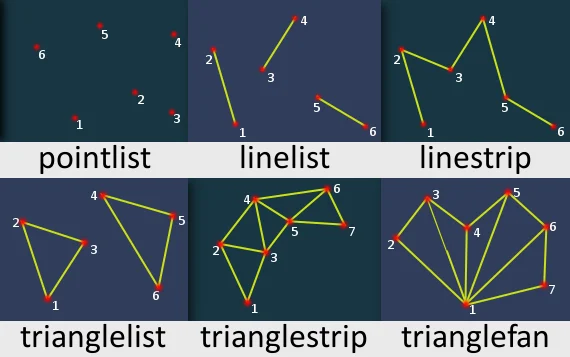
- pType: Type of primitive to be drawn. More info on MSDN site.
- pointlist: Renders the vertices as a collection of isolated points.
- linelist: Renders the vertices as a list of isolated straight line segments.
- linestrip: Renders the vertices as a single polyline.
- trianglelist: Renders the specified vertices as a sequence of isolated triangles. Each group of three vertices defines a separate triangle.
- trianglestrip: Renders the vertices as a triangle strip.
- trianglefan: Renders the vertices as a triangle fan.
- material: Either a texture element or a filepath of the image which is going to be drawn. Image files should ideally have dimensions that are a power of two, to prevent possible blurring. Use a texture created with dxCreateTexture to speed up drawing.
- stage: A string representing the stage at which the actual draw call should happen. If true is provided, the stage will be
postgui; if false, it will bepostfx.- prefx: Primitives are rendered before the color correction. This stage makes lines look natural to SA but colors could be distorted.
- postfx: Primitives are rendered after the color correction. This stage conveys a color from the function to a screen without distortions.
- postgui: Primitives are rendered after GUI. The line should be drawn on top of or behind any ingame GUI (rendered by CEGUI).
- vertex1: Tables representing each primitive vertex, required amount of them is determined by primitive type. See vertices format below:
- posX - An float representing the X position of the vertex in the GTA world.
- posY - An float representing the Y position of the vertex in the GTA world.
- posZ - An float representing the Z position of the vertex in the GTA world.
- color (optional) - An integer of the hex color, produced using tocolor or 0xAARRGGBB (AA = alpha, RR = red, GG = green, BB = blue). If it's not specified, white color is used.
- u - An float representing the relative X coordinate of the top left corner of the material which should be drawn from image.
- v - An float representing the relative Y coordinate of the top left corner of the material which should be drawn from image.
Optional arguments
Note: when using optional arguments , you might need to supply all arguments before the one you wish to use.
- vertex2... (default: nil): Tables representing each primitive vertex, required amount of them is determined by primitive type. Check table format above.
Returns
Returns a true if the operation was successful, false otherwise.
- bool: result
Code Examples
This example draws the picture with the file name "test.png" on the ground of Grove Street and adds a `/flip`` command to flip it.
local picture = "test.png"local worldRenderPositions = { -- create a table with all the world positions
    {2483, -1663, 12.4, 0, 0}, -- top left    {2493, -1663, 12.4, 1, 0}, -- top right    {2483, -1673, 12.4, 0, 1}, -- bottom left    {2493, -1673, 12.4, 1, 1} -- bottom right
}
function renderPicture()    dxDrawMaterialPrimitive3D("trianglestrip", picture, false, unpack(worldRenderPositions)) -- use unpack() to separate the pointsendaddEventHandler("onClientRender", root, renderPicture)
function flipPicture()    for index, point in ipairs(worldRenderPositions) do        if point[4] == 1 then            point[4] = 0        else            point[4] = 1        end        if point[5] == 1 then            point[5] = 0        else            point[5] = 1        end    endendaddCommandHandler("flip", flipPicture)
Gallery
Click on the image to view the full preview along with the description.
Changelog
The postGUI argument has been removed and replaced with a stage argument.
See Also
Drawing Functions
- dxConvertPixels
- dxCreateFont
- dxCreateRenderTargetUpdated
- dxCreateScreenSource
- dxCreateShader
- dxCreateTextureUpdated
- dxDrawCircle
- dxDrawImage
- dxDrawImageSection
- dxDrawLine
- dxDrawLine3D
- dxDrawMaterialLine3D
- dxDrawMaterialPrimitive
- dxDrawMaterialPrimitive3D
- dxDrawMaterialSectionLine3D
- dxDrawModel3DNew
- dxDrawPrimitive
- dxDrawPrimitive3D
- dxDrawRectangle
- dxDrawText
- dxDrawWiredSphere
- dxGetBlendMode
- dxGetFontHeight
- dxGetMaterialSize
- dxGetPixelColor
- dxGetPixelsFormat
- dxGetPixelsSize
- dxGetStatusUpdated
- dxGetTextSize
- dxGetTexturePixelsUpdated
- dxGetTextWidth
- dxIsAspectRatioAdjustmentEnabled
- dxSetAspectRatioAdjustmentEnabled
- dxSetBlendMode
- dxSetPixelColor
- dxSetRenderTarget
- dxSetShaderTessellation
- dxSetShaderTransform
- dxSetShaderValue
- dxSetTestMode
- dxSetTextureEdge
- dxSetTexturePixels
- dxUpdateScreenSource