

dxGetTextSize
Client-side
This function retrieves the width and height (in pixels) of a certain piece of text, if it were to be drawn using dxDrawText.
Note
This function already takes the client's screen resolution into account.
OOP Syntax Help! I don't understand this!
-
Note: This syntax requires you to ignore the font argument above.
- Method: dx-font:getSize(...)
Syntax
float|false, float dxGetTextSize ( string text, [ float width = 0, float scaleX = 1.0, float scaleY = 1.0, string/dx-font font = "default", bool wordBreak = false, bool colorCoded = false ] )Required arguments
- text: A string representing the text for which you wish to retrieve with width for.
Optional arguments
Note: when using optional arguments , you might need to supply all arguments before the one you wish to use.
- width (default: 0): The width of the text. Use with wordBreak = true.
- scaleX (default: 1.0): The X scale of the text. Scale can also be inputted as a Vector2.
- scaleY (default: 1.0): The Y scale of the text. Scale can also be inputted as a Vector2.
- font (default: "default"): Either a custom DX font element or the name of a built-in dx font.
- default: Tahoma
- default-bold: Tahoma Bold
- clear: Verdana
- arial: Arial
- sans: Microsoft Sans Serif
- pricedown: Pricedown (GTA's theme text)
- bankgothic: Bank Gothic Medium
- diploma: Diploma Regular
- beckett: Beckett Regular
- unifont: Unifont
- wordBreak (default: false): If set to true, the text will wrap to a new line whenever it reaches the right side of the bounding box. If false, the text will always be completely on one line.
- colorCoded (default: false): Should we exclude color codes from the width? False will include the hex in the length.
Returns
Returns two floats representing the width and height of the text in pixels, false if invalid arguments passed.
- float|false: width
- float: height
Code Examples
client
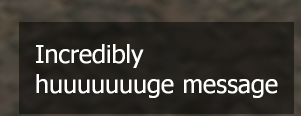
This example draws a text with black background at the bottom right corner of the screen.
local screenWidth, screenHeight = guiGetScreenSize()
local message = "Incredibly huuuuuuuge message"local messageOffset = 32local messagePadding = 16local messageWidth = 256
function renderMessage() local textWidth, textHeight = dxGetTextSize(message, messageWidth, 2, "default", true) local x = screenWidth - textWidth - messageOffset local y = screenHeight - textHeight - messageOffset dxDrawRectangle(x - messagePadding, y - messagePadding, textWidth + messagePadding * 2, textHeight + messagePadding * 2, 0x80000000) -- draw background dxDrawText(message, x, y, x + textWidth, y + textHeight, 0xFFFFFFFF, 2, "default", "left", "top", false, true)endaddEventHandler("onClientRender", root, renderMessage)Gallery
Click on the image to view the full preview along with the description.
See Also
Drawing Functions
- dxConvertPixels
- dxCreateFont
- dxCreateRenderTargetUpdated
- dxCreateScreenSource
- dxCreateShader
- dxCreateTextureUpdated
- dxDrawCircle
- dxDrawImage
- dxDrawImageSection
- dxDrawLine
- dxDrawLine3D
- dxDrawMaterialLine3D
- dxDrawMaterialPrimitive
- dxDrawMaterialPrimitive3D
- dxDrawMaterialSectionLine3D
- dxDrawModel3DNew
- dxDrawPrimitive
- dxDrawPrimitive3D
- dxDrawRectangle
- dxDrawText
- dxDrawWiredSphere
- dxGetBlendMode
- dxGetFontHeight
- dxGetMaterialSize
- dxGetPixelColor
- dxGetPixelsFormat
- dxGetPixelsSize
- dxGetStatusUpdated
- dxGetTextSize
- dxGetTexturePixelsUpdated
- dxGetTextWidth
- dxIsAspectRatioAdjustmentEnabled
- dxSetAspectRatioAdjustmentEnabled
- dxSetBlendMode
- dxSetPixelColor
- dxSetRenderTarget
- dxSetShaderTessellation
- dxSetShaderTransform
- dxSetShaderValue
- dxSetTestMode
- dxSetTextureEdge
- dxSetTexturePixels
- dxUpdateScreenSource